
A Modern iView MediaPro Alternative for Mac
For photographers who valued iView MediaPro, choosing a new cataloging application is about keeping a way of working: see the shoot, make decisions, and find those decisions again.
The workflow worth carrying forward
The appeal of a catalog-first photographic workflow is straightforward: scan a shoot visually, mark the contenders, group related work, and return to those decisions later. iView MediaPro gave many photographers a way to think about a collection beyond a folder of filenames.
When assessing an alternative, ask practical questions. Can you browse without first moving everything? Do ratings and labels support your own process? Can one photograph belong to more than one set? Can you compare near-identical frames? And can the application explain exactly what happens to your old catalog?
Lightbox Pro is an independent native macOS application by Zippi Technologies, inspired by that focused cataloging philosophy. It is not affiliated with, endorsed by, or a continuation of the original iView MediaPro product. The current application is a tested development build; public release details have not yet been announced.
A native Mac working library
Lightbox Pro keeps a local catalog of referenced photographs. The current application has Thumbnail, List and Media views, ratings, color labels, filtering and nested catalog sets. The catalog records your organization while the photographs stay in their source locations.
That distinction matters. Adding a photograph to a set is an organizational decision, not a request to create another image file. A library can support a job, a shortlist and a longer-term subject collection without treating them as three separate copies of the photograph.
Keyboard navigation and rating shortcuts support a manual first pass. You decide which frames remain in contention; the current application does not promise automated AI culling, face ranking or blur detection. Independent native catalog windows let separate jobs retain their own selection and viewing state.
For a working selection outside the catalog, Transfer’s Copy mode prepares separate copies while keeping the source photographs and catalog references in place. Copying a selection and changing an original reference are distinct actions that deserve review.
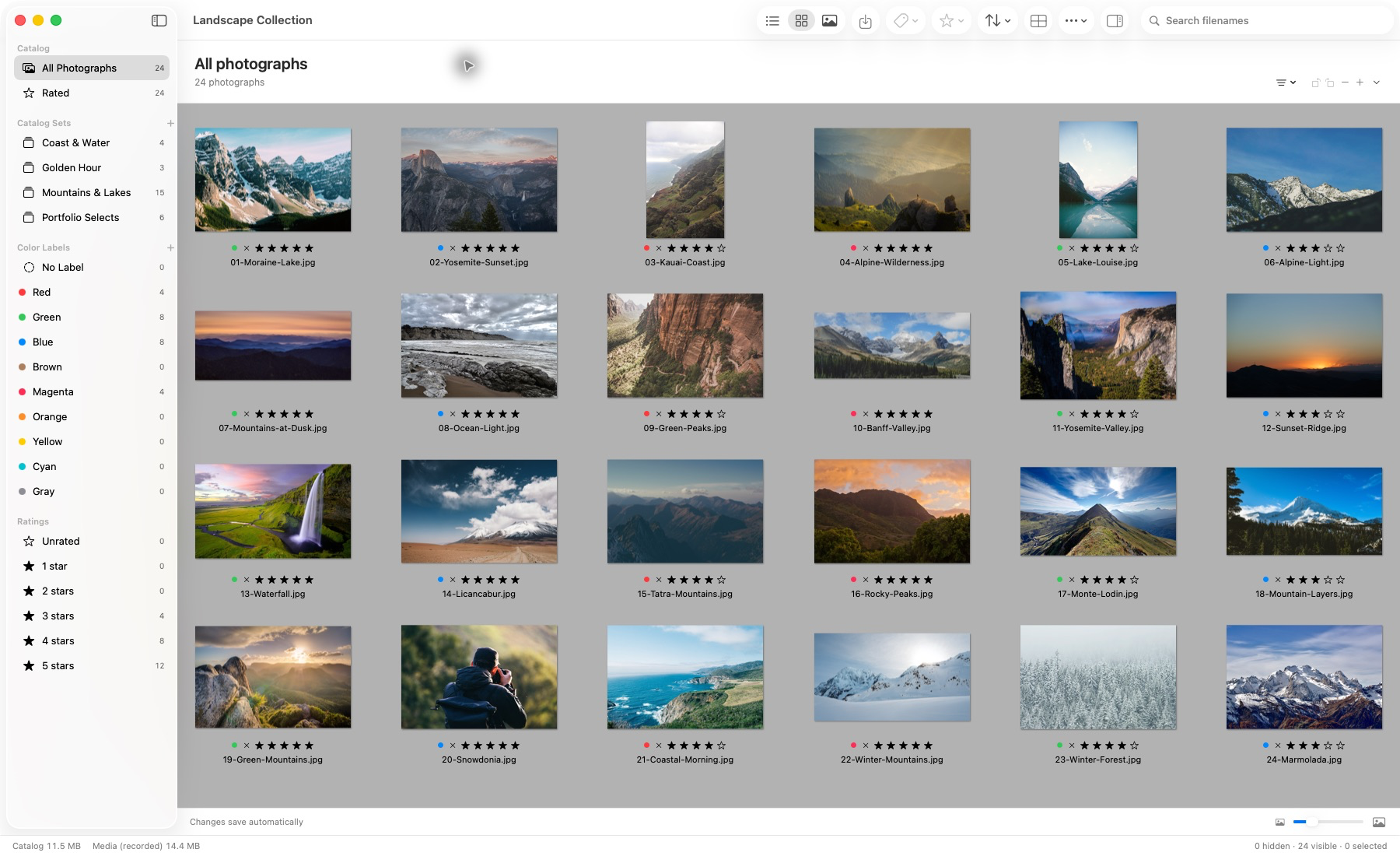
Actual application capture. Photographs remain in their source locations.
A second look in Light Table
Once the first pass is smaller, comparison becomes more useful than scrolling. Light Table displays one to six selected photographs, with linked or independent zoom and pan. You can compare expression, framing and the detail that separates similar frames.
Use the originals when making a full-detail focus decision. Persistent offline previews support browsing when a source is unavailable, but their reduced detail is not a substitute for the original pixels. A useful comparison workflow keeps that distinction visible.
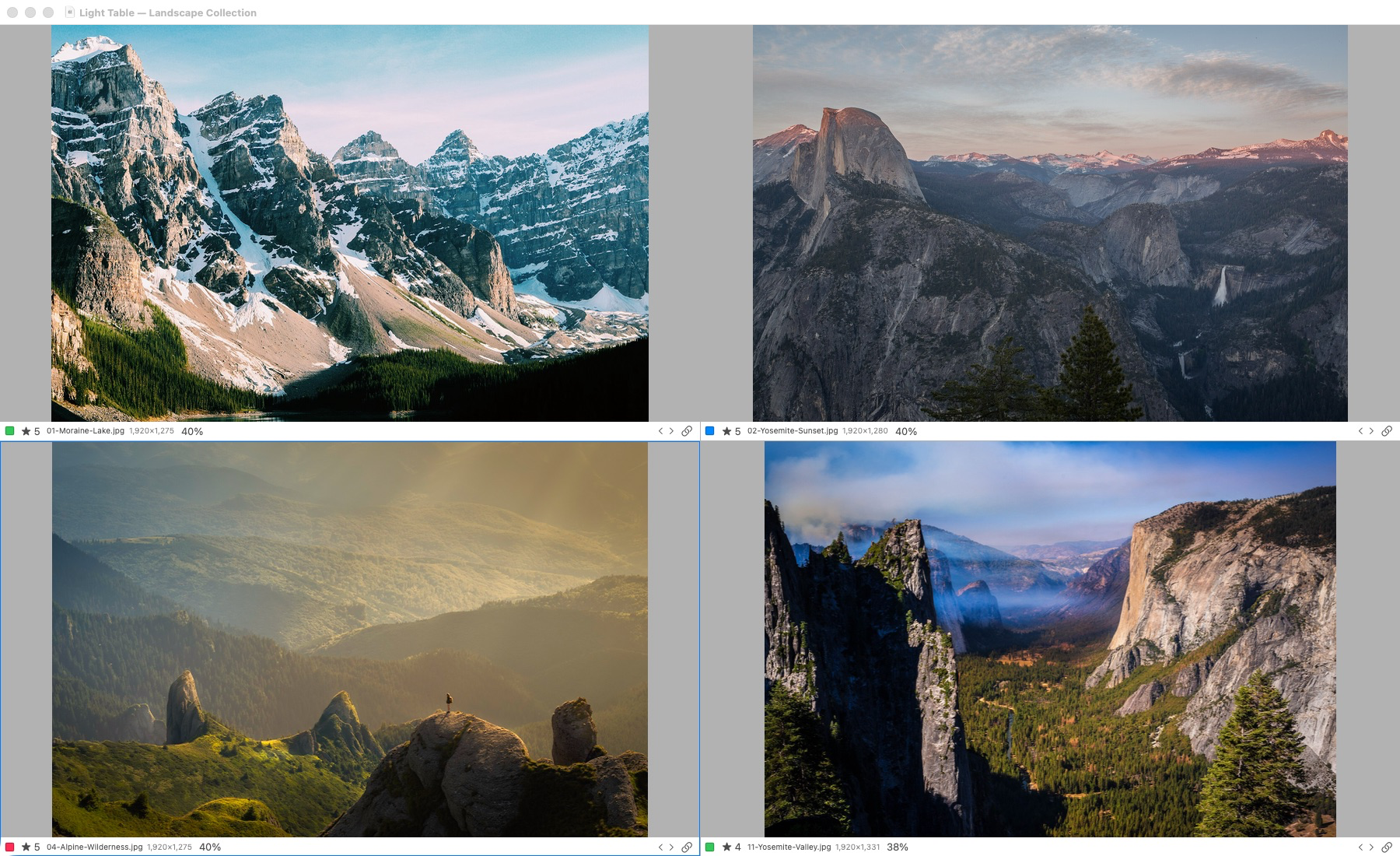
Actual application capture. Light Table supports one to six selected photographs. Original-detail inspection requires access to the originals; offline previews have reduced detail.
Explore the Light Table workflow and linked-view illustration. The website illustration explains the interaction; the application screenshots show the real interface.
Opening the old catalog
A replacement workflow is only part of the problem if years of organization are locked in a legacy file. Lightbox Pro’s direct .ivc import reads a verified 025i subset with JPEG, TIFF and PSD records, presents a review, and creates a separate .lightbox catalog. XML import is also available through a separate route.
The documented historical restoration cases contain 24 and 133 photographs. Explicit parent-folder mapping restored moved source references, and native viewing, organization and reopening were checked. Unsupported required structures still block conversion; original custom label names and colors are not reconstructed. Supported imported descriptions, keywords and custom-field values are retained as read-only metadata.
Read how to open iView MediaPro catalog files on a modern Mac for backup preparation, the review steps, missing-source troubleshooting and exact preservation limits. A migration claim should tell you what was tested, not just say “compatible.”
There is also an operating-system question: Apple ended support for 32-bit apps in macOS Catalina 10.15. If your old application is 32-bit, a current Mac cannot simply run it as before. Apple’s compatibility guidance explains that boundary. It does not establish compatibility for any particular catalog importer.
What works and what comes next
- Tested in the development application
- Local catalog browsing; keyboard selection; ratings, labels, filters and nested sets; independent catalog windows; one-to-six-image Light Table; supported legacy import and explicit source-folder mapping.
- Preview refinement
- Editable crop and rotation, Black & White and Sepia have native JPEG/TIFF checks. One Canon EOS 5D Mark II CR2 sample has crop and B&W preview-path checks. That sample is not broad camera compatibility or true RAW sensor development. Custom Duotone has a remaining native color-panel acceptance check.
- Future capabilities
- Professional RAW development, broader ingest and culling tools, portrait retouching, client galleries and delivery, returned print/album selections, and album design belong to the longer-term vision. They are not all available in the reviewed application.
- Release and platform acceptance
- The reviewed native checks used an M4 Mac on macOS 26.6.2. They do not certify every Apple Silicon model, minimum-memory configuration, Intel Mac or older macOS version. Public release availability, final requirements and pricing have not been announced here.
The current preview edits protect originals by storing editable decisions in the catalog. They are useful tools for considering a photograph’s framing and treatment, while full RAW processing and protected rendered proof output remain separate engineering work.
Is this the right fit?
Lightbox Pro is being built for photographers who want a local working library, hands-on culling and comparison, and a careful route for supported legacy catalogs. It is particularly relevant if a familiar cataloging approach matters more to you than starting with an all-in-one cloud service.
If you need a publicly available, fully specified production system today for camera ingest, advanced RAW development, client delivery or album production, assess those requirements separately. Follow Field notes for confirmed application progress rather than treating the roadmap as a delivered feature list.
A useful evaluation is concrete: choose a backed-up sample job, check your original files and organization, inspect the comparison workflow, and verify what survives saving and reopening. Avoid deciding on a speed superlative without a measured test on your own hardware and workload.
Common questions
Is Lightbox Pro the original iView MediaPro?
No. Lightbox Pro is independently developed by Zippi Technologies. It takes inspiration from a focused cataloging workflow and has a separately implemented importer for supported legacy files.
Does it replace a complete RAW editor today?
No. Crop, rotation and tested preview effects are distinct from RAW sensor development. Professional RAW controls, broad camera acceptance and full-source proof export remain separate work.
Can clients already return print and album choices?
Hosted private galleries and returned selections are planned capabilities. The client approval page explains the intended workflow and labels its website gallery as an illustration.
How do I evaluate an old .ivc file?
Begin with an untouched backup, locate the originals and review the supported catalog profile. Compatibility depends on contents, not only the extension. Contact software support for release and review availability.
Continue with the current photographic workflow or the story behind Lightbox Pro.