
How to Open iView MediaPro Catalog Files on a Modern Mac
An old catalog can hold years of decisions. Bringing it forward starts with understanding what is in the catalog, where the photographs live, and what an importer can actually recover.
What an .ivc catalog holds
iView MediaPro was a visual media cataloging application. A catalog organized references to photographs alongside information such as ratings, labels, sets, annotations and previews. For photographers returning to an archive, that organization can be as valuable as the files themselves.
An .ivc file is a catalog, not a folder of full-resolution photographs. A preview may still be visible when the original image is on a disconnected drive or in a different folder. Preserve the catalog and the original media; recovering one does not automatically recover the other.
Why opening the old app is difficult
Older Mac software can stop running as operating systems change. Apple confirms that macOS Catalina 10.15 and later do not run 32-bit applications. If your original cataloging app is a 32-bit version, simply copying it to a current Mac does not make it compatible. See Apple’s explanation of 32-bit app compatibility.
Opening the catalog with a separate importer is a different task from running the old application. Lightbox Pro, developed independently by Zippi Technologies, takes that import approach: read a supported legacy catalog, review it, and create a new native .lightbox catalog.
What Lightbox Pro has verified
The current development build accepts a verified subset of binary .ivc catalogs identified internally as 025i, with supported JPEG, TIFF and PSD records. It also has a separate XML-import route. The filename extension alone does not establish compatibility. Unsupported or ambiguous required structures stop the binary conversion rather than silently dropping photographs.
Two documented historical restoration cases contained 24 and 133 photographs. Explicit parent-folder mapping reconnected moved originals; native viewing, organization and reopening were checked within the supported profile. These are specific cases, not evidence that every catalog version or every field will convert perfectly.
- Photograph references and order
- Supported paths and source order are retained. A new native identity is created for each photograph while the original identifier is preserved as import information.
- Ratings, labels and sets
- Numeric ratings and label assignments become native values. Supported set hierarchy and membership are preserved. Browsing within a set uses catalog order. Original custom label names and colors are not reconstructed; native defaults are reported.
- Descriptions, keywords and custom fields
- Supported text, repeated keywords and named custom-field values are retained as imported metadata. Those imported values are currently read-only; preservation does not mean every field has a native editing or search interface.
- Technical information
- Verified technical fields and supported orientation information are retained. Unknown semantics are not guessed. Some source information remains archived rather than exposed as a usable native field.
- Previews and originals
- Legacy preview bytes are archived, not installed as Lightbox Pro’s viewing cache. Lightbox Pro creates its own persistent previews after an authorized original successfully loads. Reduced-detail previews do not replace original files for sharpness inspection.
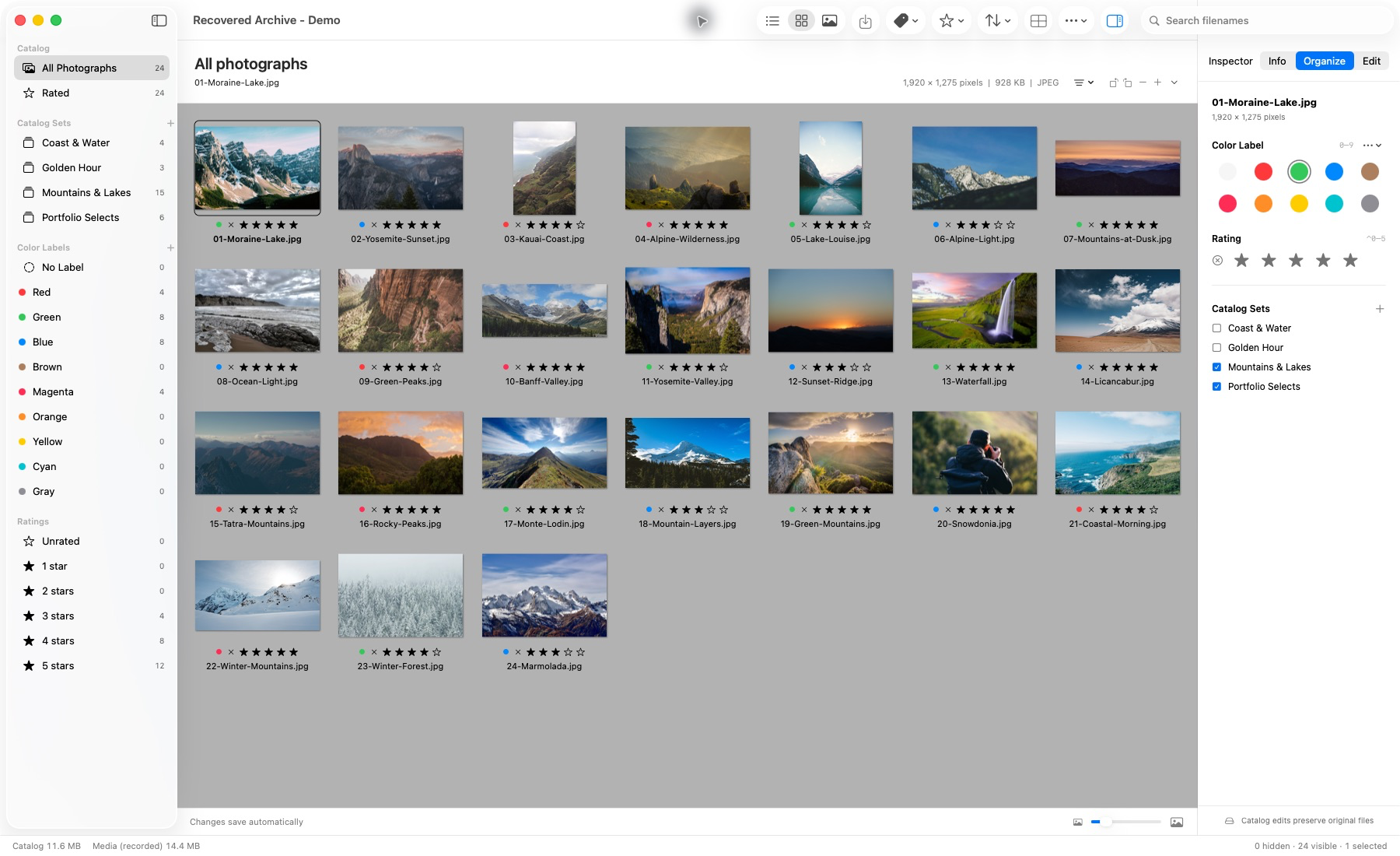
Generated .ivc catalog, imported and reopened in the Mac app. This demonstration does not establish compatibility with every historical catalog.
Prepare your archive before importing
- Keep an untouched backup of the original
.ivcfile. Work from a separate copy and retain any earlier conversions. - Locate the original photographs and reconnect their drive. Keep the existing folder and subfolder structure while you assess the catalog.
- Record the old parent-folder location and the corresponding current parent folder. A mapping must connect equivalent levels of the folder tree.
- Choose a new destination and an unused
.lightboxfilename. Keep the result distinct from your source archive.
If you already have an XML export from the old application, retain it too. XML import is a separate reviewed path, not proof that an unsupported binary catalog can be accepted. You do not need to produce XML first for a supported direct .ivc import.
Review, reconnect and convert
These are the documented steps in Lightbox Pro’s tested development application. Public release details have not yet been announced; use Field notes or contact software support for the current position.
- Open the import review. Choose File → Import Legacy Catalog…, then Choose Catalog or XML… and select your catalog copy. Opening an
.ivcfile also leads to this review. - Read the assessment. Check photograph count, organization, proposed references and review notes. Resolve a blocking compatibility error before proceeding. An archived-settings warning has a different meaning from an unsupported required record.
- Reconnect a moved parent folder when needed. Expand Reconnect a source folder, enter the old prefix exactly as recorded, and choose Choose Replacement Folder…. Select the matching current parent folder. The relative subfolders must still lead to the intended photographs.
- Check the proposed matches. A zero missing count means the proposed paths exist. Check the folder structure, dimensions and available capture information where versions or duplicates could cause ambiguity. A matching filename alone is insufficient.
- Create the new catalog. Choose Convert Catalog… and save to a new, unused
.lightboxfilename. The legacy catalog is not edited in place. - Inspect and reopen. Check real photographs in Thumbnail, Media and Light Table, including the final rows and TIFF/PSD files. Compare ratings, labels, sets and imported metadata. Let successful viewing create previews, quit normally, and reopen the result before treating it as your working copy.
Keep the original backup after a successful import. A separate converted catalog gives you a working library while retaining the source evidence for future compatibility work.
When something needs review
The count is right, but photographs are missing
Imported catalog entries can exist without available originals. Check whether the drive is mounted and whether the old and replacement parent folders represent the same level. Preserve relative subfolders. Do not select an arbitrary same-named photograph to make a warning disappear.
A photograph says “Preview only”
This identifies reduced-resolution pixels, not necessarily a missing-file error. Inspect the availability status and, with access to the original, check Actual Size. An offline preview is useful for browsing but cannot establish full-resolution focus or export quality.
The importer reports an unsupported structure
Stop and preserve the original file. Renaming the extension or bypassing review will not establish safe compatibility. Contact support@getlightboxpro.com with the application version, file size and non-sensitive error wording. Do not send private catalogs or client photographs until a suitable review process has been agreed.
Should I use Rebuild to find moved originals?
No. Rebuild refreshes file facts and previews at an existing reference; it does not discover a new location. Reconnecting a source folder is the relevant import step for a moved folder tree.
Common questions
Does Lightbox Pro open every .ivc catalog?
No. Direct import covers the verified 025i JPEG/TIFF/PSD subset. Required unsupported records or ambiguous structures block conversion. The 24- and 133-photo cases do not establish universal compatibility.
Will the import change my original catalog or photographs?
The import review creates a separate native catalog at an unused destination. It does not edit the legacy catalog in place or move the original photographs. Keep your own backup as well.
Can the catalog recover full-size photographs that have been lost?
A catalog reference or embedded preview is not the original full-size file. Locate the original media or a separate backup. Archived preview bytes are not automatically promoted into Lightbox Pro’s viewing cache.
Is this a public release announcement?
No. These instructions describe tested development functionality. Release availability and final platform requirements will be announced separately in Field notes.
For the supported profile and the preservation boundaries in one place, read the catalog compatibility notes. For the broader working-library philosophy, see a modern iView MediaPro alternative for Mac.