
Adobe Bridge vs Lightbox Pro: Files, Collections and Catalogs
Decide what owns the photographic record: existing folders, portable metadata, collection references or a dedicated catalog.
Publisher disclosure: we develop Lightbox Pro. This comparison uses current official product information and verified application source. It is not an independent third-party review, a hands-on competitor benchmark or a public-release announcement.
Choose between a working view of files and an explicit photographic catalog
Adobe Bridge is a capable choice for photographers who want to browse existing folders, work with descriptive metadata and connect to Adobe editing tools. Lightbox Pro is being developed for a referenced Mac photographic catalog, explicit image comparison and supported legacy catalog recovery. Bridge’s free download makes it worth considering, but the wider editing workflow can have separate licensing requirements.
The useful question is not whether one application has a database somewhere inside it. Bridge maintains caches and persistent collection records; it is misleading to call it an application with no stored organization. The distinction is the user’s working model: browsing and grouping files through Bridge versus opening a Lightbox catalog whose records, sets and previews form the organized photographic workspace.
This article follows a small commercial studio that needs both a job folder and a reusable photographic history. It compares responsibilities and recovery behavior, rather than reproducing a general explanation of folders, collections and catalogs. Bridge statements come from current Adobe sources; Lightbox statements concern reviewed development build 0.1.2 (63). This is not a hands-on performance ranking.
A side-by-side summary without the false “browser or nothing” choice
| Requirement | Adobe Bridge | Lightbox Pro |
|---|---|---|
| Starting point | Browse existing folders and creative assets. | Open a referenced local photographic catalog. |
| Grouping | Collections across folders; smart collections from saved searches. | Nested catalog sets, ratings, labels and filters. |
| Finding photographs | Folder search with multiple criteria and optional subfolders. | Filename search; general descriptive-metadata search is not available. |
| Visual review | Preview panel up to nine images, full-screen Review mode and Loupe. | One-to-six-image Light Table; linked or independent zoom/pan and provenance-aware Loupe. |
| Descriptions and interchange | Metadata editing and XMP-based Adobe exchange. | Imported legacy text is read-only; no general XMP writeback. |
| RAW editing | Camera Raw route, subject to qualifying activation. | Preview adjustments; app-controlled sensor RAW development is unfinished. |
| Original iView catalogs | No verified binary .ivc importer asserted here. | Limited supported 025i JPEG/TIFF/PSD profile, plus a separate XML route. |
| Output | Documented export and Adobe application routes. | Internal raster encoding; no completed GUI rendered-export workflow. |
A browser can be sufficient for a well-run photographic business. A catalog can be insufficient if it cannot retrieve the information the business actually needs. Treat the distinction as a design choice, then ask which records survive closing the application, moving a working copy and handing an image to another operator.
Bridge’s strength is meeting an existing project where it lives
The official Bridge product page documents asset previews, metadata, ratings, labels, filters, Adobe application integration and export. It also covers creative assets beyond photographs. A studio that hands a folder containing images and design work to a colleague has a concrete reason to evaluate that breadth rather than dismiss it as clutter.
For example, a hypothetical portrait campaign has a source folder, a retouched-master folder and a delivery folder. A separate designer maintains layout files. The studio may prefer a working view of that familiar structure over another import stage. Its success depends on a naming and version policy: an attractive thumbnail alone cannot identify which master is approved or which JPEG was delivered.
Keep the roles visible. A source belongs to the capture record. A retouched master carries a particular editing history. A delivery file has a purpose and specification. Putting them beside one another can be convenient, but it should not make them interchangeable. A folder-first workflow benefits from a short job note explaining those roles and a documented place for accepted decisions.
Lightbox’s catalog offers another perspective on the photographic portion of the job. A set can gather relevant source images without duplicating them into another folder. That may be valuable when the same photograph belongs to a client job, a portfolio candidate list and an archive review. It does not establish support for every mixed-media asset that Bridge can preview.
Collections add persistent organization, with references to maintain
Adobe’s collections documentation explains grouping across folders or drives, criteria-based smart collections and repair of missing references. Removing a collection itself does not remove the source photographs. Moving a file outside Bridge can require reference repair. The meaningful distinction is therefore not “Bridge has no collections,” but which organizational record you intend to maintain.
A reusable portfolio collection is different from copying files into a portfolio folder. The former points to assets; the latter creates another physical arrangement and may create another version to manage. Both can be useful when deliberately chosen. Problems arise when an operator expects a reference to be a backup, or believes a copied preview is the full-resolution master.
In Lightbox Pro the catalog and its nested sets are similarly distinct from originals. A new grouping does not by itself create another independent source copy. The catalog therefore deserves its own backup alongside the sources it references. Copying the originals alone may preserve photographs while omitting the studio’s catalog decisions.
Use a tiny test with three files and two groups. Put one photograph in both groups, close the application and reopen it. Then, on working copies, change the source location in a controlled way. Record what reports the missing source, what still displays a preview, and what information is necessary to reconnect it. The exercise identifies dependencies that a feature checkbox cannot show.
Metadata search is a material advantage when the archive is descriptive
Bridge’s search reference documents combined criteria, optional subfolder scope and searching uncached files, with a possible performance cost. Its saved-search route can form a smart collection. That is a substantial difference from Lightbox Pro’s current filename-only search, especially when the desired photograph is remembered through a caption or keyword rather than its filename.
Suppose a studio needs the photograph of a person wearing a blue coat from several earlier campaigns. If “blue coat” exists only in a descriptive field, filename search cannot be expected to find it. Adding more catalog sets is not automatically an equivalent solution; somebody would have to create and maintain a reliable grouping for that concept.
Before choosing, write five actual retrieval questions from the business. Include a job name, a person or subject, a usage restriction, a filename fragment and a previous delivery. Identify where each answer is stored. A requirement that depends on full-text metadata retrieval should be treated as an acceptance blocker for a build that does not implement it.
Also distinguish a search from a claim that a file is safe to use. A result may identify the right subject but an outdated deliverable or an unresolved rights question. Descriptive metadata can improve retrieval without replacing the studio’s approval authority. Our photographic DAM guide develops that responsibility beyond the application interface.
Test what travels with the file and what stays in an application
Bridge metadata templates can append information to empty properties or replace existing metadata. Adobe warns that an included property with an empty value can clear existing information. Its cross-application metadata explanation also says Lightroom changes must be saved to XMP before Bridge can recognize them. Shared terminology does not remove the need to check the actual record.
This is especially relevant for a mixed team. A photographer may regard a caption as complete because it is visible in one application, while the designer opens a file whose embedded record has not changed. A catalog-only rating can create the same misunderstanding. Decide which application writes the authoritative descriptive record before several operators begin editing it.
Use a sample with invented descriptive information. Apply a narrowly scoped template to one image, inspect its changed fields, then verify the receiver. Do not begin by replacing metadata across an entire archive. Keep a backup of the test state, including sidecars. If a field unexpectedly disappears, stop and identify the writer rather than applying another template as a guess.
One current format-specific exception deserves care: Adobe documents additional XMP files when Bridge updates JPEG metadata containing Content Credentials. That example is not a universal statement about every JPEG. It shows why a workflow should inspect actual dependencies rather than assume a rendered image is always a self-contained package.
Lightbox Pro does not currently offer an equivalent general-purpose metadata writing system. Its imported descriptive text has preservation value inside the catalog, with read-only treatment in the reviewed build. Do not assume that editing a label or set there updates Bridge, Camera Raw or a delivered image. Keep an established writer when that interchange is part of the production requirement.
Comparison exists in both applications; test the difficult photograph
Adobe documents multiple-image previews and a full-screen Review mode, plus a Loupe and synchronized movement of multiple Loupes. Lightbox’s Light Table offers explicit selections of one to six images with linked or independent zoom and pan. The decision is not whether Bridge can compare photographs; it is which arrangement makes your difficult choices clear.
For a portrait job, select three alternates in which the face, hands and posture disagree about the strongest frame. Review at a useful whole-image scale before inspecting the face. Then return to the wider view to check the choice in context. Record whether the comparison retains the intended candidates and whether changing zoom creates unnecessary reorientation.
For a landscape, choose images whose framing differs slightly. Linked movement is not automatically the right answer if the important feature lies in a different position. Independent pan can establish the detail question, while the whole-image view establishes the composition. A good interface supports the decision instead of rewarding the operator for checking sharpness alone.
Lightbox’s Loupe identifies a boundary between verified raster detail, system RAW images with unverified detail, editing previews and reduced offline previews. An unavailable original remains unavailable even if a cached view is attractive. Confirm close decisions in the intended processor when preview provenance cannot establish the required detail.
A cache is useful working data, not a substitute for the archive
Bridge’s cache management reference documents cache location, compaction, purging and separately generated 100% previews. These controls create a performance and storage tradeoff. A warm-cache result and a first visit to a large folder are different test conditions; neither should be silently substituted for the other in a speed comparison.
The archive test should begin with a question about recovery, not with a cache purge. Can another authorized operator reopen the job and locate the intended source, accepted decisions and finished file? Cache cleanup may be routine, but performing it cannot prove that a missing original has been backed up. Equally, preserving a cache alone does not preserve every organizational record.
Set a practical cache policy for the machine being evaluated. Leave enough working space for the operating system and other production tools. Record whether the test used generated previews and whether the storage was local or remote. We make no universal NAS compatibility claim for Lightbox from a local import exercise.
Bridge is a route into Camera Raw, not “no editing”
Bridge can open RAW photographs into Camera Raw. The current Adobe activation article states that Camera Raw editing through Bridge requires an active Photoshop subscription and that Photoshop should be launched once to enable it. A free Bridge download should not be represented as a free entitlement to every linked editing capability.
The distinction matters when budgeting a workflow. A photographer who already licenses the required editor may find Bridge an economical front end. A new user must account for the processor that actually renders the deliverable. Compare the complete intended entitlement rather than the price of a browser in isolation.
Lightbox’s current preview crop, rotation, Light, Levels, Color Balance and Duotone adjustments are a different scope. Sensor RAW development remains unfinished. Internal JPEG/TIFF/PNG encoding does not yet provide a finished GUI rendered-export workflow. A RAW photograph appearing in the catalog is not evidence that Lightbox replaces Camera Raw’s development pipeline.
A useful output acceptance check is to select one backed-up RAW, one rendered master and one crop-sensitive image. Record which application changes each, where the change is stored, and which program produces the final deliverable. Inspect the actual dimensions, appearance and required metadata in that deliverable rather than judging only its preview.
Lightbox Pro’s catalog and legacy focus
Lightbox Pro’s native Mac approach is most relevant when a photographer wants a dedicated photographic working library rather than a broad creative-asset browser. In build 63, local referenced catalogs combine ratings, color labels and nested sets with the Light Table and Loupe. Current keyboard work preserves continuous left/right movement through displayed grid row order; it is a usability result, not a comparative benchmark.
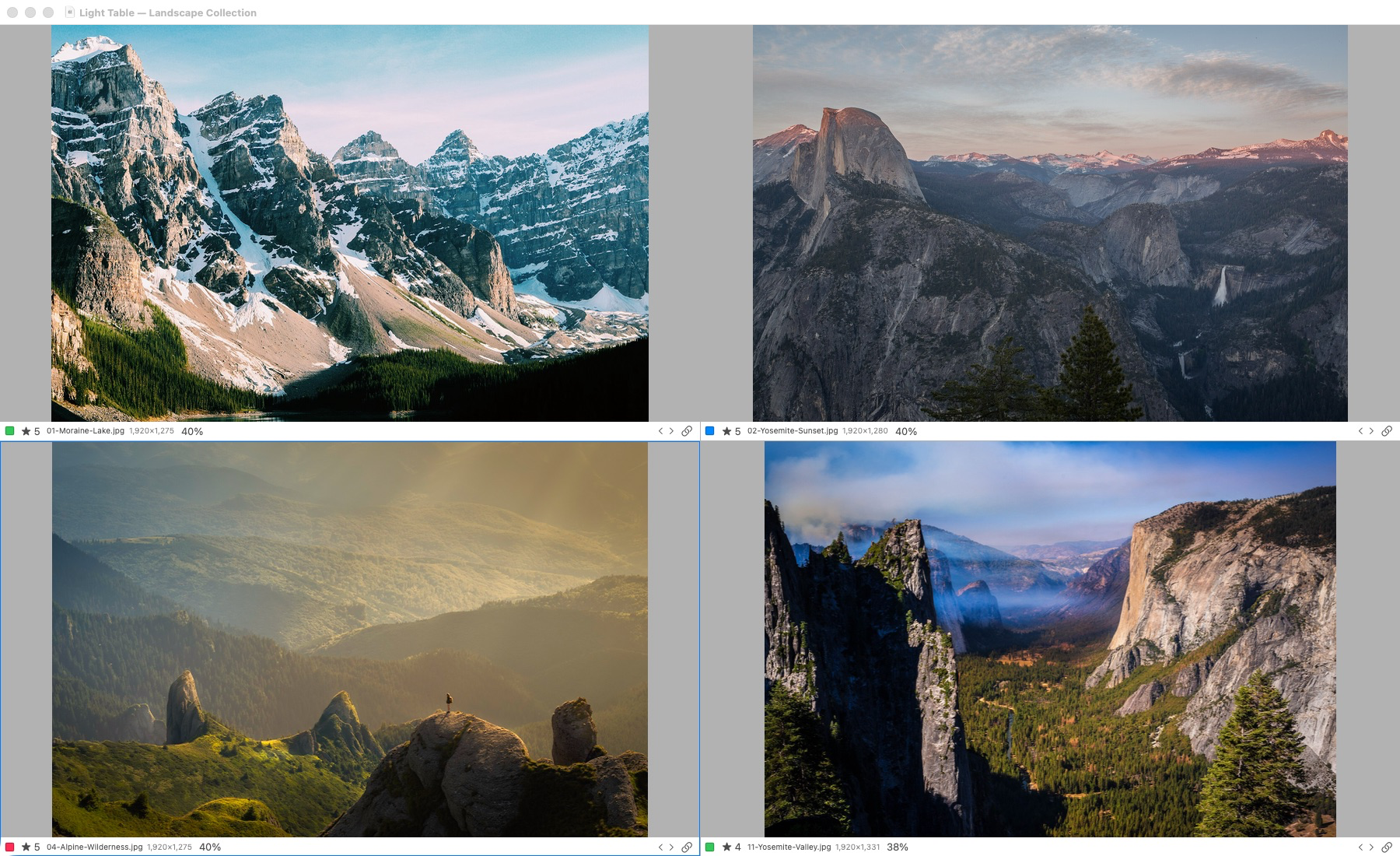
Actual application capture. Light Table supports one to six selected photographs. Original-detail inspection requires access to the originals; offline previews have reduced detail.
This is the supplied earlier build 50 Light Table screenshot. It illustrates the established comparison workspace without pretending to show newer controls. Later engineering evidence includes a native acceptance exercise using 1,403 copies of one supported public Canon CR2 sample. That is not a diverse camera corpus and does not certify every RAW camera or storage configuration.
Original iView catalog support can be a stronger reason to evaluate Lightbox than a general claim that it is “simpler.” Direct import has a verified limited 025i JPEG/TIFF/PSD scope, with 24- and 133-photo historical cases. A separate XML path is available under its documented conditions. There is no universal compatibility claim and no verified import of Bridge collection records as an equivalent catalog.
Preserve the old catalog and its original media. Run a backed-up sample through the .ivc import procedure, then check counts, references and the descriptive values you need. For missing local sources, reconnection proposes candidates for explicit approval; it repairs references rather than recreating lost originals.
Choose an authority before adding another application
| Responsibility | Question to answer | Reason to stop the trial |
|---|---|---|
| Descriptions | Which application writes captions and copyright? | Operators cannot identify which record is authoritative. |
| Selection | Where are the final accepted filenames recorded? | Different applications show unexplained conflicting decisions. |
| Processing | Which licensed processor creates delivery files? | The candidate only displays a preview of the required output. |
| Retrieval | Can the five real archive questions be answered? | A required query depends on a missing search capability. |
| Recovery | Can the job be reopened from separate backups? | Only cached previews survive the restore exercise. |
A studio can keep Bridge for metadata and creative handoff while evaluating Lightbox separately for cataloging. But adding both creates another authority to explain. Do not tell staff that ratings synchronize unless that exact path has been verified. A written filename list can aid a bounded trial; it is not a claim of seamless integration or a scalable replacement for missing metadata exchange.
Mac compatibility, licensing and the practical choice
The Bridge 16 requirements list macOS 13, 14, 15 and 26, compatible Intel or Apple silicon hardware, and 8 GB minimum memory; Apple silicon with 16 GB is recommended. Adobe also requires an Adobe ID and internet activation. Check the exact release and associated Camera Raw requirements on your own Mac.
No final Lightbox Pro retail price, license entitlement or broad commercial compatibility promise is established here. Evaluate the demonstrated build within its stated limits. Neither “native” nor “free” is a substitute for the file types, editor and recovery path a business requires.
Choose Bridge when existing folders, rich metadata work and Adobe handoffs are central. Evaluate Lightbox when the referenced photographic catalog, manual multi-image comparison or supported iView recovery solves a specific problem. Explore Lightbox Pro and use the organization without moving originals guide to design a reversible first step.
Sources and verification
Reviewed 21 October 2026 using the official Adobe references below and Lightbox Pro build 63 at commit 6daf3493a024e62f48b2bd0b9f22094c4fe6fad4. Studio examples and test questions are original recommendations. They are not a report that both applications passed those tests. Browser, collection, cache and catalog are distinguished by their practical responsibilities rather than by unsupported claims about internal implementation.
Official references
Official documentation reviewed 21 October 2026. Product versions, plan terms and supported systems can change. The Lightbox Pro statements use development build 0.1.2 (63); application tests are recorded engineering evidence, not independently rerun in this Windows website review.
- Adobe: Bridge product and free download
- Adobe: Bridge 16 technical requirements
- Adobe: collections, smart collections and missing references
- Adobe: criteria-based folder searches
- Adobe: preview, Review mode and Loupe
- Adobe: cache management and 100% previews
- Adobe: metadata templates and append/replace behavior
- Adobe: metadata exchange with Camera Raw and Lightroom
- Adobe: Camera Raw editing activation in Bridge
- Adobe: JPEG metadata with Content Credentials
Lightbox Pro is independently developed by Zippi Technologies and is not affiliated with or endorsed by the other product’s developer. Product names identify the software being discussed. No competitor logo, screenshot, review rating or paid placement is used.