
Narrative Select vs Lightbox Pro: AI-Assisted and Manual Culling
Evaluate how candidates are found, how difficult moments are judged and how a trusted selection reaches the editor.
Publisher disclosure: we develop Lightbox Pro. This comparison uses current official product information and verified application source. It is not an independent third-party review, a hands-on competitor benchmark or a public-release announcement.
The difference is who finds the candidates before you judge them
Narrative offers assessment-assisted culling and plan-dependent scene tools. Lightbox Pro currently provides manual selection inside a native Mac catalog, with an explicit Light Table and Loupe. There is no verified Lightbox AI culling system. A photographer who requires those assessment tools today should evaluate Narrative on its actual merits.
That does not make the decision a contest between automation and artistic integrity. A human can use assessment aids thoughtfully, and a manual workflow can still make poor selections. The practical question is which interface helps you review the right candidates, notice meaningful exceptions and preserve the accepted decisions for the next stage.
This comparison concentrates on a portrait-and-wedding culling trial with difficult expressions, deliberate motion and group photographs. It complements our broader manual versus AI culling guide by examining the two products’ actual responsibilities and handoffs. Competitor capabilities are researched from official sources; no invented customer results or comparative timing measurements are presented.
“Narrative Select” now requires a current plan check
Photographers still search for Narrative Select, and older pages use Free and Pro terminology. The current Narrative pricing page presents Lite, Standard, Premium and Ultra, with monthly and yearly subscription choices, culling in every plan, and editing entitlements varying by tier. Use that current offer and the plan-entitlement explanation, rather than assuming an older Select screenshot describes today’s subscription.
For this article, “Narrative” means the current culling workflow and the relevant plan—not the separate Publish blogging application. Its editing options also need to be distinguished from merely sending selected photographs to an editor. A photographer can want a strong culling front end without wanting an AI editing preset; those should be evaluated as separate requirements.
Likewise, Lightbox Pro’s long-term platform vision is not the tested build. The evidence here concerns development version 0.1.2 (63). Native cataloging, manual review and comparison have implemented behavior; automatic culling, a finished sensor RAW developer, hosted client approval and album design do not. A fair comparison states that gap before asking a reader to invest time in an evaluation.
Compare the intervention, not the word “AI”
| Question | Narrative | Lightbox Pro |
|---|---|---|
| Who assembles similar moments? | Advanced-plan Scenes group candidates. | The photographer makes explicit selections and catalog sets; no automated scene grouping is established. |
| What assists technical review? | Face assessments and plan-dependent inspection aids. | Manual Loupe inspection with detail provenance; no AI focus or expression scores. |
| Who decides what stays? | First Pass guides decisions; it does not reject or delete photographs. | The photographer applies ratings, labels and sets; automatic deletion is not available. |
| How are candidates compared? | Review views and entitlements depend on the plan. | One-to-six-image Light Table with linked or independent zoom and pan. |
| How do decisions travel? | Documented XMP ratings and shipping to supported editing applications. | Catalog decisions are local; general XMP writeback and automatic editor synchronization are not implemented. |
| What happens beyond culling? | Current plans can include AI editing with defined preset entitlements. | Preview adjustments; no finished sensor RAW development or GUI rendered export. |
| What about an old .ivc archive? | No original binary importer claim made here. | Verified limited 025i JPEG/TIFF/PSD route and separate XML import. |
Check the official Lite-versus-advanced explanation for entitlements. These are practical differences, not product scores. A photographer may value a face-focused aid highly for a group portrait and less for an abstract or a backlit silhouette. The test should include the photographs that make your own work difficult.
A scene is a review aid, not the complete story of the job
Narrative documents Scenes as groups of very similar photographs in capture-time order, with navigation between scenes and within a scene. Its keyboard reference distinguishes image navigation, scene navigation, rating and Survey modes. That can reduce the work of finding nearby alternates; it is different from Lightbox’s explicitly assembled comparison.
Consider a hypothetical wedding sequence containing an entrance, a spontaneous reaction and a formal group. Similarity is useful for locating alternates, but the narrative purpose changes between those moments. The reaction may matter even if it is technically imperfect. A technically strong image can still repeat a moment already represented more clearly elsewhere.
Begin an evaluation with a description of the intended coverage. For a group, every required person and their expression may matter. For a sequence, a transitional photograph may be valuable because it connects two stronger pictures. Ask whether the interface makes it easy to inspect the wider context after looking closely at one face.
Do not evaluate automated grouping only on an easy burst. Include a photograph taken just before the nominal sequence, an intentional change of camera position and a repeated group at a later time. Record whether important candidates are easy to find. If a grouping does not match your editorial purpose, establish a manual way to compare the intended photographs before deciding that one is missing.
Separate technical suspicion from an editorial rejection
An assessment can tell the photographer where to look. It cannot know every delivery promise, family relationship or artistic intention. That distinction is useful even when an assessment is accurate: a closed eye during a laugh may have a different meaning from an accidental blink in a formal portrait.
Build a small challenge set from backed-up working copies. Include a conventionally sharp face, a person looking away, deliberate movement, a shallow-depth portrait with only one eye intended to be sharp, and a group where somebody near the edge matters to the client. Write the expected review question for each before seeing any assessment. This avoids redefining success merely to match what the software happens to highlight.
Then record false exclusions and false distractions separately. A false exclusion is an important photograph that becomes hard to notice under the chosen review settings. A distraction is a candidate that consumes attention without helping the brief. Neither result proves all AI is good or bad; it shows the adjustment or manual check this assignment needs.
Manual Lightbox review has a different cost: the photographer must assemble and inspect the candidates. It avoids relying on an unavailable scoring system, but it does not automatically guarantee better judgment or a complete pass. Use clear set membership and a final context review to reduce accidental omissions. For the technique itself, see wedding culling.
A culling trial with separate capture, decision and output records
For a practical studio trial, create a small working-copy job with several short sequences, a group and a few one-off moments. Use the same written brief in both applications. Do not require identical selection counts: the aim is a defensible result, not an artificially equal number. Keep the initial choices and reasons before a later second pass changes them.
During the review, note where the photographer had to search for a candidate, reset zoom, reinterpret a rating or return to context. Those observations identify meaningful friction. A raw elapsed time can hide the fact that one pass skipped a difficult group or omitted an essential person. Measure completion of the brief and the cost of correcting mistakes alongside any duration.
A second reviewer can check coverage without being told which application produced each list. This is an optional studio exercise, not research we claim to have conducted. If the reviewers disagree, preserve both reasons and identify whether the brief, the viewing source or a personal editorial preference explains the difference.
Fast previews need a known detail source
Neither a responsive display nor a high magnification value independently proves that the deciding eye is acceptably sharp in the final rendering. Establish what you are viewing. A camera-generated preview can differ from the processor’s later interpretation. A reduced cached view can be adequate for expression while remaining inadequate for close technical rejection.
Lightbox Pro makes this explicit through the Loupe’s provenance categories and 100%, 200% and 400% inspection. Verified raster source detail is distinguished from system-rendered RAW with unverified detail, editing previews and reduced offline previews. Use that information when choosing whether the current view answers the question. Zooming further does not add missing source information.
In either evaluation, retain the candidate until the intended RAW processor resolves a close technical doubt. Use the same destination processor and a consistent viewing size. Do not compare a heavily sharpened output on one side with an unprocessed preview on the other, then attribute the difference to the culling interface.
The sharpness guide separates motion, missed focus, display scaling and processing. That diagnostic approach remains useful whether the first suspicion came from a person or an assessment. The final requirement is a photographic result appropriate to its use, not a particular colored indicator.
A selection is not complete until the editor receives it correctly
The Narrative quickstart documents XMP sidecars created for ratings and shipping selections to an editing application. Keep those sidecars with their sources. The same tutorial describes optional AI preset application during shipping; that is a separate choice from transferring an unedited selection.
A useful test has three named photographs and a deliberately varied decision state. Give one a required rating, leave one undecided and choose one as an alternate. Ship only the intended selection, then inspect the actual files and ratings in the receiver. Confirm that a rejected or undecided frame did not arrive merely because a filter was misunderstood.
Also record how color labels are interpreted. The same color can represent “needs retouch” in one studio and “client approved” in another. A visible color match does not prove a shared workflow meaning. Document the policy before another operator begins work. Our ratings and color labels guide explains a practical separation of quality, task state and final selection.
Lightbox’s catalog ratings, labels and sets currently do not establish that downstream XMP exchange. A separate editor can remain the production authority while Lightbox is evaluated on backed-up sources, but a manually repeated selection adds work and the possibility of disagreement. Do not describe this as one-click integration. If automatic transfer is mandatory, treat its absence as a present limitation.
Local culling does not describe every optional Narrative feature
Narrative’s current photo-use explanation says culling and AI assessments run locally. Optional “Help improve Narrative” uploads previews; Personal AI Preset training uploads edited images and edit data separately. Publish is another, separate upload path. Disabling one optional setting does not disable the data use required by another feature you choose.
The useful privacy check is feature-specific. Identify whether the trial uses only culling, optional feedback, preset training or publishing. Review the relevant account settings before importing restricted material. Record the intended use with the project so a colleague does not enable a different feature under the assumption that all operations are local.
For Lightbox’s reviewed local catalog workflow, the sources, previews and organizational decisions form local working records. That is a description of the implemented path, not a promise about every future client or cloud feature. Hosted approval is not currently an available service in the reviewed build. Keep unimplemented platform ambitions separate from a present data-handling decision.
Do not put private client material into a trial simply to answer a UI question. Synthetic or appropriately authorized sample photographs can test navigation, grouping and metadata. A confidential commission may require a separate organizational review of vendor terms and account settings. This comparison provides an evaluation method, not an invented privacy certification for either product.
Lightbox Pro’s place beyond the first selection pass
Lightbox Pro’s differentiating idea is a native Mac photographic home that retains a deliberately organized, referenced library. In build 63, nested catalog sets, ratings and color labels support manual culling and later organization. Filename-only search is a real limit: imported descriptive text does not become a general keyword search system merely because it has been preserved.
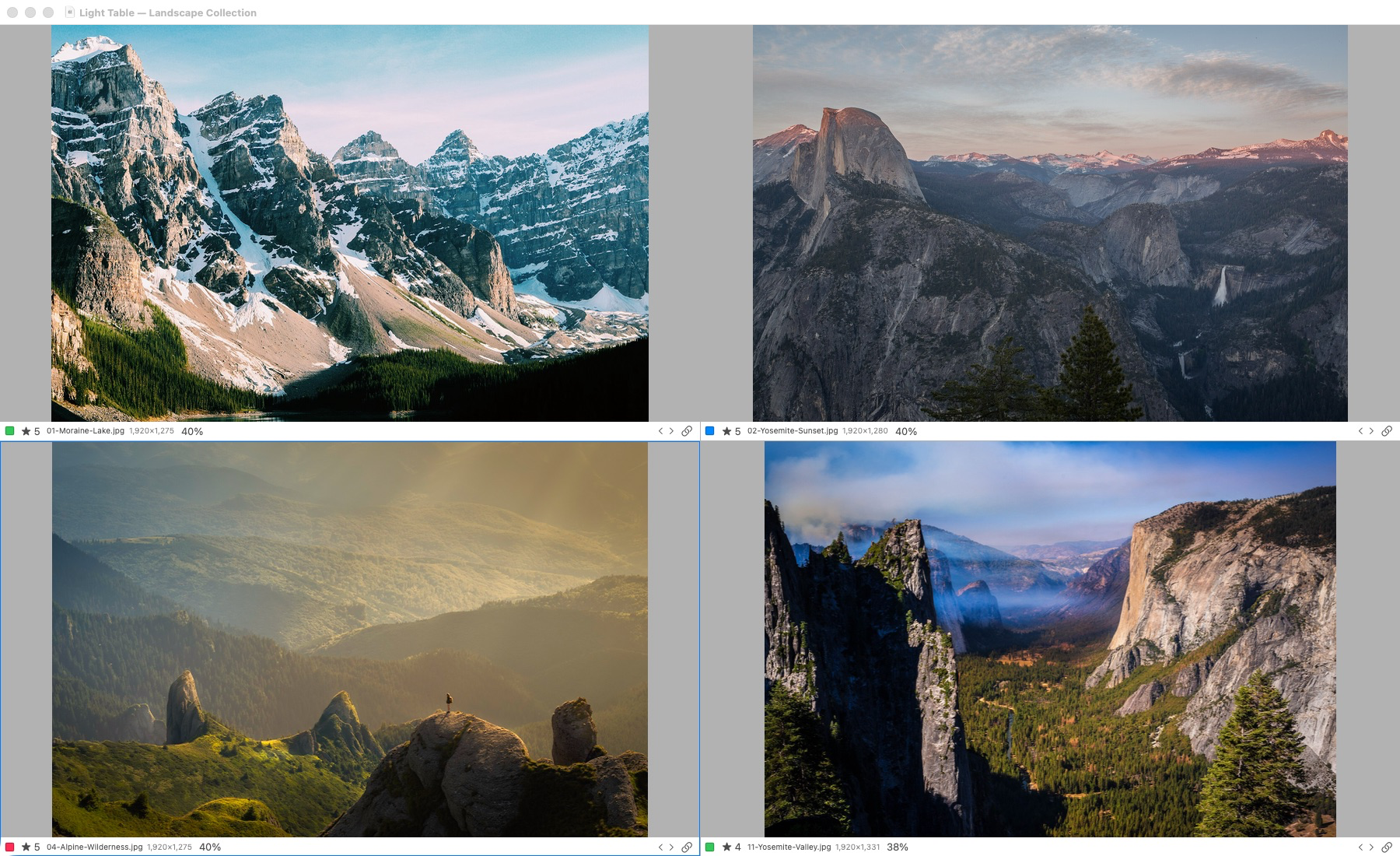
Actual application capture. Light Table supports one to six selected photographs. Original-detail inspection requires access to the originals; offline previews have reduced detail.
The earlier build 50 screenshot shows the established Light Table interface. Current evidence adds keyboard continuity through the grid and a recorded native acceptance exercise using 1,403 copies of one supported public Canon CR2 sample. This is not a diverse camera corpus, a comparison with Narrative’s import speed or proof of broad camera or whole-career library acceptance.
The Light Table is particularly relevant when the photographer already knows which candidates need direct attention. It displays one to six explicit selections with linked or independent zoom and pan. That is different from an algorithm finding similar moments. Choose it for the deliberate comparison task it implements, rather than claiming it silently performs Narrative’s scene grouping.
Supported iView migration is another separate reason to evaluate Lightbox. Its verified binary import covers a limited 025i JPEG/TIFF/PSD subset; historical 24- and 133-photo cases do not prove universal compatibility. A separate XML route has its own conditions. There is no claim that a Narrative project is an iView catalog or that Lightbox can import Narrative’s complete project decisions.
Lightbox’s editing work currently consists of preview crop and rotation, Light, Levels, Color Balance and Duotone. App-controlled sensor RAW development, a finished GUI rendered-export path, automatic duplicate finding, portrait retouching and client selection synchronization are not available. Those gaps matter when choosing a complete postproduction platform, even if the catalog and comparison approach appeals to you.
Choose the exceptions before choosing the subscription
| Situation | Decision to verify | Evidence to retain |
|---|---|---|
| Once-only reaction | An imperfect but essential moment stays visible for review. | Filename and reason tied to the brief. |
| Formal group | Every required person receives an expression/detail check. | Accepted frame plus named unresolved concern, if any. |
| Intentional motion | Technical suspicion does not silently override intention. | Context view and a human decision. |
| Editor handoff | Exactly the intended sources and ratings arrive. | Receiver count, filenames and decision state. |
| Reopened job | Selections remain understandable after the session. | A short policy explaining ratings and accepted outputs. |
Use these checks to decide whether the workflow is trustworthy before trying to optimize its speed. If a required handoff fails, record it as a blocker instead of working around it so quickly that the problem disappears from the comparison. If an assessment helps consistently, keep that observation without extrapolating a universal percentage of time saved.
Licensing, Mac requirements and who should choose each
Narrative’s current subscription tiers separate basic and advanced culling, editing entitlements and user allowances. Confirm the chosen tier, billing period, currency and any trial terms on the linked current pricing page before purchase; an old Free/Pro plan name is not a verified current offer. This review does not assign a numerical cost advantage to Lightbox because its final retail price and licensing are not established.
The Narrative requirements article lists macOS 12 or later, 8 GB memory and 1 GB free application space, recommends SSD storage, and says iPad is not supported. Source images, working space and the separate editor require additional capacity. Verify the current download and your exact Mac rather than treating those minimums as a performance guarantee.
Choose Narrative when its documented assessment-assisted culling and editor handoff address the work you need now, then test the exceptions that matter to your photographs. Evaluate Lightbox for an explicit manual comparison process inside a native referenced catalog, particularly where supported iView preservation has value. They are not equivalent finished platforms, and retaining an established production tool during evaluation is reasonable.
Explore Lightbox Pro through its real interface and the side-by-side comparison guide. Make the first trial small enough that every selected image and its next destination can be checked. That provides a more useful answer than a claim that one application always makes a photographer faster.
Sources and verification
Reviewed 21 October 2026. Current Narrative pricing, support articles and dated release notes were reviewed rather than assuming older Select Free/Pro marketing remains current. Lightbox evidence is development build 63, commit 6daf3493a024e62f48b2bd0b9f22094c4fe6fad4. All studio scenarios and acceptance sheets are original proposals, not customer testimonials, completed head-to-head tests or measured speed claims.
Official references
Official documentation reviewed 21 October 2026. Product versions, plan terms and supported systems can change. The Lightbox Pro statements use development build 0.1.2 (63); application tests are recorded engineering evidence, not independently rerun in this Windows website review.
- Narrative: current Lite, Standard, Premium and Ultra plans
- Narrative: current plan entitlements
- Narrative: minimum Mac and Windows requirements
- Narrative: Lite versus advanced culling and First Pass limits
- Narrative: Scenes, Grid and Loupe views
- Narrative: current keyboard shortcuts
- Narrative: project, XMP ratings and editor handoff tutorial
- Narrative: local culling, optional previews and Personal AI Preset data
- Narrative: dated release notes
Lightbox Pro is independently developed by Zippi Technologies and is not affiliated with or endorsed by the other product’s developer. Product names identify the software being discussed. No competitor logo, screenshot, review rating or paid placement is used.