
Photo Mechanic vs Lightbox Pro: Ingest, Culling and Catalogs
Follow an assignment from card to editor to archive, and see where each application has a documented role.
Publisher disclosure: we develop Lightbox Pro. This comparison uses current official product information and verified application source. It is not an independent third-party review, a hands-on competitor benchmark or a public-release announcement.
Two different responsibilities behind a fast photographic workflow
Photo Mechanic is the stronger documented choice when the immediate requirement is established card ingest, interoperable photographic metadata and delivery to another editor. Lightbox Pro is worth evaluating for a native Mac catalog, deliberate visual comparison and supported original iView MediaPro catalog recovery. These can be different jobs within one studio. Neither the word “fast” nor the presence of stars makes the applications interchangeable.
This comparison examines a specific replacement decision: what must remain dependable from the moment a card is connected until a chosen image reaches the editor and can be found later? It differs from our broader Photo Mechanic alternatives guide by following those handoffs, their records and a practical acceptance exercise. Competitor behavior is documentation-based; we have not run a controlled head-to-head speed test.
The Lightbox Pro evidence concerns development build 0.1.2 (63), not an assertion that a finished commercial release is available. A studio with a deadline should keep its established production system while testing. A replacement is accepted when the whole assignment survives its handoffs, rather than when a single thumbnail appears quickly.
First resolve standard Photo Mechanic, Plus and older licenses
Camera Bits’ dated 2026 notice withdraws new Photo Mechanic Plus purchases while standard Photo Mechanic continues. Existing Plus owners should consult support. A standard purchase should not be treated as including the historical Plus catalog.
A photographer may therefore face two separate decisions. One concerns an active assignment tool that is working well. The other concerns a historical catalog and the machine needed to read it. Replacing the first does not automatically migrate the second. Keep the original database, its associated files and a verified backup until you have checked an explicit migration route. Lightbox Pro has no verified Photo Mechanic Plus database importer.
Edition and version also affect Mac planning. The current Camera Bits notice distinguishes the modern Apple silicon native application and customizable shortcut sets from Photo Mechanic 6. Do not transfer a compatibility result from an older perpetual installation to the current application, or assume an old license grants every current version. A purchasing decision should identify the product, entitlement and intended operating system in writing.
The feature comparison that changes the decision
| Requirement | Photo Mechanic | Lightbox Pro |
|---|---|---|
| Card handling | Background ingest to primary/secondary destinations. | Local catalog import and progressive browsing; equivalent card-copy automation is not established. |
| Comparison | 2-Up Preview, with horizontal or vertical arrangements. | Light Table for one to six explicit selections, with linked or independent viewing. |
| Metadata exchange | Configurable IPTC/XMP writing and compatibility preferences. | Catalog ratings, labels and sets; imported descriptive text is read-only. No general XMP writeback. |
| Persistent library | Distinguish standard folder workflow from the withdrawn Plus database. | Referenced local catalog and nested sets; search is filename-only in this build. |
| Close inspection | Documented RAW preview/rendering choices; verify the chosen source. | Loupe at 100%, 200% and 400%, with source-detail provenance. System RAW detail remains unverified. |
| Rendered output | Documented Save As command. | Internal JPEG/TIFF/PNG encoding exists; completed GUI export is not available. |
| Original iView .ivc | No direct compatibility claim made in this comparison. | Verified limited 025i JPEG/TIFF/PSD import profile and a separate XML route. |
The table is intentionally asymmetric. It describes the implemented role of each application without converting every difference into a win. For example, six comparison panes can be useful for a group portrait, while metadata compatibility can determine whether a single selected frame reaches a publication correctly. The value depends on the assignment’s non-negotiable result.
Ingest speed includes the second copy and the next person
The Photo Mechanic reference explains its ingest settings. The important evaluation is the complete path: the intended files reach the intended destinations, their identities remain understandable, and review does not quietly exclude a camera or folder. Those are stronger criteria than counting how quickly a contact sheet opens.
Consider a hypothetical editorial job with two camera bodies. The photographer wants an initial selection while a second card is still being copied, and an assistant must later find the original associated with each selected JPEG. Before evaluating either application, define a naming policy that avoids collisions between the two cameras. Keep a record of which card contributed which files. Choose an existing verified copying procedure if the candidate application does not provide the required ingest behavior.
In Lightbox Pro, catalog import should be understood as adding photographic records and preparing useful views. It is not evidence that the same source has been copied to two independent destinations. Progressive visibility is useful: a photographer can begin inspecting committed records while further import work continues. Yet a visible record, an offline preview and an independently checked original copy are three different things. Record their states separately.
For a fair trial, begin with backed-up working copies, then repeat the same task from a fresh catalog or known cache state. Include one portrait-orientation file and one unusually large image. Check whether cancellation leaves a comprehensible result. Keep elapsed time only alongside the hardware, file types, storage and preview preparation; an isolated duration cannot establish a product-wide performance claim.
Caption exchange can be more decisive than the culling interface
Photo Mechanic’s current metadata preferences prioritize RAW XMP sidecars by default and provide controls for embedded information in supported rendered formats. Its compatibility snapshots help configure exchanges with other software. These are substantial strengths for workflows whose captions, creator details and ratings must remain readable outside the selection application.
The acceptance question is specific: after the receiving application opens the chosen original, does it show the intended caption and selection state? Do not assume that seeing a star in both applications proves the entire record transferred. A caption can occupy a different field from a headline; a label’s text can have a different interpretation from its color. A recipient may see stale embedded information while a newer sidecar holds another value.
Use a synthetic test image rather than a real client record. Give it a recognizable caption, a rating and a label. Record which application is authorized to change each item. Close the writer, open the receiver and inspect the values. Then modify only one field and repeat. Keep the source and any sidecar together. This small exercise is more informative than asking whether both products “support metadata.”
Lightbox Pro currently offers a different authority: decisions within its catalog. Ratings, labels and sets help organize that library, but there is no verified general metadata writeback mechanism that makes those decisions automatically authoritative in another editor. Imported legacy keywords, descriptions and custom fields are preservation records with read-only treatment. A studio that must deliver agency-ready metadata should keep a proven writer and validate any separate use of Lightbox.
Compare the question in the photograph, then inspect its source
Photo Mechanic’s 2-Up documentation establishes that direct comparison is already part of that application. Lightbox Pro approaches a broader explicit selection through its Light Table. More panes are useful only if they reduce the work needed to answer a real question. Four nearly identical portraits can be compared for expression; two landscapes may deserve larger individual views.
A practical comparison can have two passes. First ask which photograph carries the desired moment. Then check the deciding detail at a known useful scale. Holding a reference while changing an alternate prevents the comparison from becoming a memory exercise. Linked pan and zoom can help maintain a comparable area; independent viewing can help when camera position or framing differs.
The Photo Mechanic RAW rendering reference distinguishes embedded previews from available rendering paths. Lightbox’s Loupe similarly makes the origin of detail important: a system-rendered RAW image is not certified sensor-level evidence, and a reduced offline preview cannot recover information that it does not contain. Magnification changes display scale, not the underlying proof of detail.
Do not reject a once-only expression merely because a preview is unclear. Check whether the original is available and which rendering is being displayed, then confirm the candidate in the intended RAW processor if necessary. Conversely, a sharp preview says little about highlight recovery, color matching or the final print. Those belong to later acceptance checks.
Where Lightbox Pro offers a different working home
Lightbox Pro is being developed around a native Mac interface and a separate photographic catalog that references source files. The current implementation combines Thumbnail, List and Media views with ratings, color labels, filters and nested catalog sets. That provides a place to preserve a chosen organization without rearranging originals merely to create another grouping.
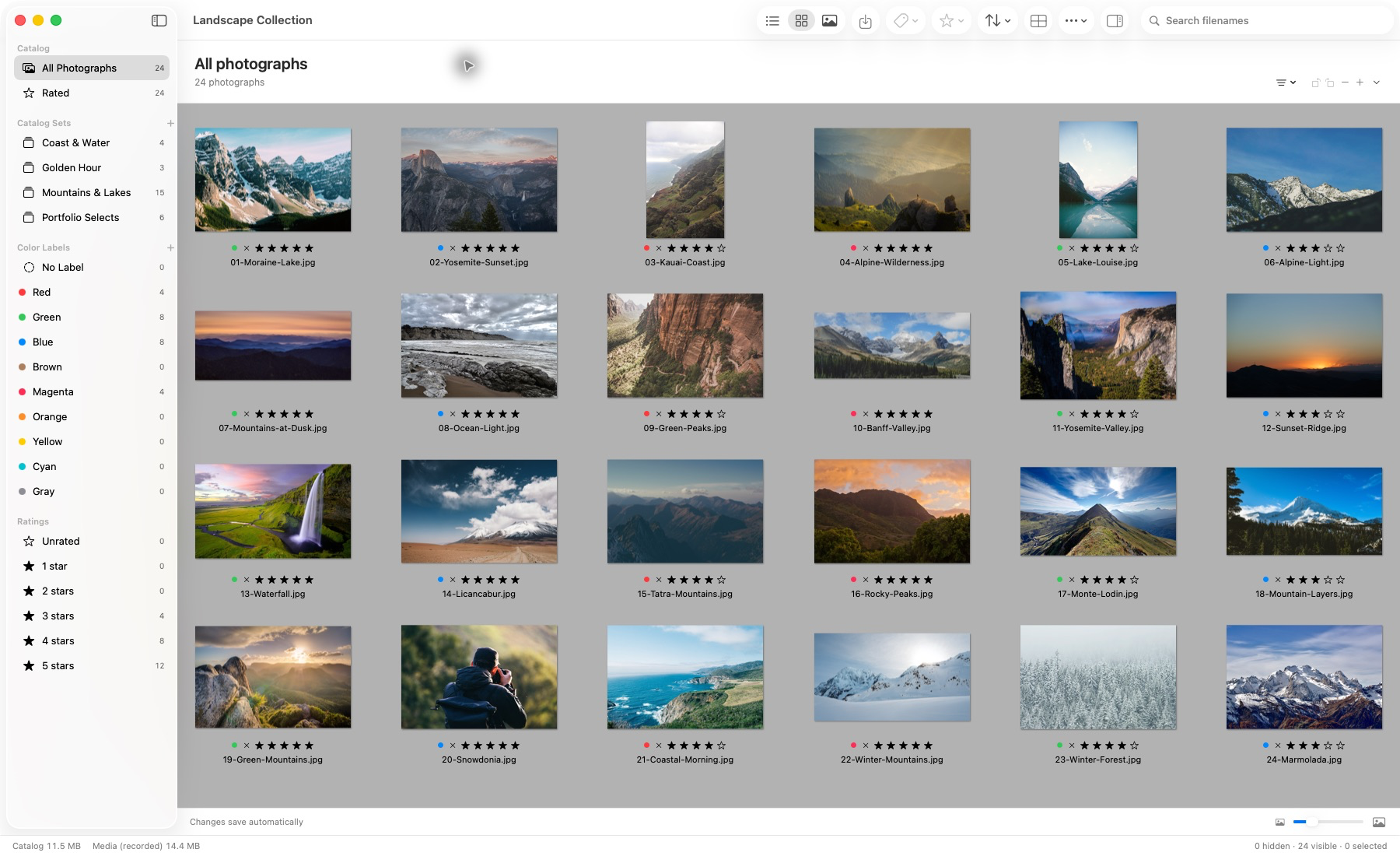
Actual application capture. Photographs remain in their source locations.
The supplied screenshot is an approved earlier build 50 capture of the established catalog interface. It is not a screenshot of every build 63 control. The current source review confirms a continuous left/right keyboard sequence through the grid’s displayed row order. It does not establish equivalent key assignments across products, nor a comparative culling-speed result.
Legacy catalogs are a distinct reason to investigate this approach. The verified original iView importer covers a limited binary 025i JPEG/TIFF/PSD profile; the documented 24- and 133-photo historical cases are evidence for those cases, not every catalog ever saved. The separate XML route has its own requirements. Begin with the supported .ivc procedure and preserve the source catalog.
Build 63 also has a recorded native acceptance exercise using 1,403 copies of one supported public Canon CR2 sample. It helps establish that particular import and interaction path. It is not a diverse camera corpus and does not certify every camera, damaged file, storage system or all-day professional workload. Treat a successful sample as a reason to test your own backed-up material, not a substitute for doing so.
The editing boundary remains important. Crop, rotation, Light, Levels, Color Balance and Duotone operate as preview adjustments. Sensor RAW development is unfinished. Internal corrected-raster encoding is engineering progress, not a finished export workflow. Automatic duplicate finding, AI culling, hosted client approval and an album designer are not available in the reviewed build.
An assignment handoff with an explicit authority at each stage
Imagine a sports assignment requiring twelve photographs for a publication and a larger personal archive. The twelve need accurate names, captions and a dependable route to the publication’s preferred output. The archive needs a way to find the assignment next season. These are related but different acceptance requirements.
Photo Mechanic’s established ingest and metadata tools make it a reasonable front-end candidate for the publication path. Lightbox can be evaluated on separate backed-up sources for a local catalog and deliberate comparison. That combination should not be described as a seamless integration: catalog selections are not verified to synchronize automatically with Photo Mechanic, and a manually recreated set is not an interoperable metadata exchange.
If the extra handoff adds uncertainty, retain a single production authority and postpone the second application’s role. The most efficient system can be the one with fewer ambiguous decisions rather than fewer clicks. A photographer should be able to answer, without guessing, which twelve files were delivered and which version of their captions was accepted.
A practical acceptance sheet for your next evaluation
| Check | Record | Pass condition |
|---|---|---|
| Two source groups | Source identifiers and expected counts | Every intended file is accounted for without relying only on thumbnail count. |
| Human selection | Chosen filenames and reasons for three difficult decisions | The same intended photographs remain selected after reopening. |
| Metadata handoff | Synthetic caption, label and rating in the receiver | Required fields are correct in the application that actually delivers them. |
| Detail review | Original availability and displayed source | No photograph is rejected on a reduced preview mistaken for full detail. |
| Return to the job | Catalog, originals, sidecars and version notes | Another authorized operator can identify the accepted selection. |
Include an intentional interruption in the test: disconnect a working-copy drive after closing applications, then reconnect it and inspect the result. Do not perform this on the only originals. The goal is to learn which records depend on an active volume and how the application reports missing sources. Lightbox’s local reconnection is a bounded, approval-based repair of references, not recovery of deleted originals; the missing-file guide explains the distinction.
Also test returning after several days. A workflow that makes sense immediately after the shoot can become obscure once the photographer forgets why a color was applied. Keep a one-paragraph selection policy with the job. Distinguish technical rejects, editorial alternates and the final accepted delivery instead of collapsing them into a single unexplained star threshold.
Choose a stopping rule before the trial: an unexplained missing original, contradictory caption or ambiguous delivery identifier requires investigation before the production assignment moves. A known unresolved issue is more useful than a deceptively tidy pass report.
Licensing, Mac requirements and the cost of a transition
The current Camera Bits pricing article offers monthly and annual subscriptions or a perpetual license. Perpetual purchase includes one year of updates and support, then use of the last compatible version. Check the current checkout for your currency, tax and total rather than comparing an unlabeled dollar amount. The requirements page currently specifies macOS 13 or later, up to two computers per license, and periodic internet validation even for perpetual licenses.
No verified public Lightbox Pro purchase price or final license entitlement is established in this review. Do not turn that uncertainty into a zero-cost claim. Compare the eventual license with the actual job you intend to move, including a RAW processor or metadata writer that may still be required. Existing investment is relevant when it preserves a reliable production path.
Budget time for a reversible trial, training and a recovery check. A cheaper application is not automatically a cheaper workflow if the studio must re-enter captions or manually reconstruct decisions. A subscription is not automatically worse if its maintained compatibility is valuable to the job. The useful comparison is the cost of a supported result over the time you need it.
Choose for the work you cannot afford to lose
Choose Photo Mechanic for a current production requirement centered on documented ingest and metadata interchange, subject to testing your exact downstream tools. Treat any historical database as a separate preservation problem. A change in another product’s availability or a future operating system does not establish a direct migration path into a different catalog.
Evaluate Lightbox Pro if a native Mac catalog, explicit multi-image comparison or supported iView catalog recovery addresses a genuine gap. Its current limits mean it is not a complete replacement for every Photo Mechanic responsibility. Explore Lightbox Pro, then use the practical wedding culling guide to define a trial that ends with a verifiable photographic result.
Sources and verification
Reviewed 21 October 2026. Camera Bits sources support competitor-specific statements; workflow exercises are original proposals, not firsthand comparative test results. Availability follows the dated notice rather than old store cards. Lightbox Pro was checked against build 63, source commit 6daf3493a024e62f48b2bd0b9f22094c4fe6fad4. Current release availability, pricing and broader camera acceptance remain separate questions.
Official references
Official documentation reviewed 21 October 2026. Product versions, plan terms and supported systems can change. The Lightbox Pro statements use development build 0.1.2 (63); application tests are recorded engineering evidence, not independently rerun in this Windows website review.
- Camera Bits: current system requirements and license validation
- Camera Bits: Photo Mechanic pricing, subscription and perpetual terms
- Camera Bits: Photo Mechanic Plus purchase withdrawal, updated 2 March 2026
- Camera Bits: current ingest documentation
- Camera Bits: current IPTC/XMP preferences
- Camera Bits: metadata compatibility snapshots
- Camera Bits: 2-Up Preview
- Camera Bits: RAW rendering and embedded previews
- Camera Bits: current Save As output tool
- Camera Bits: current application versus Photo Mechanic 6 on Mac
Lightbox Pro is independently developed by Zippi Technologies and is not affiliated with or endorsed by the other product’s developer. Product names identify the software being discussed. No competitor logo, screenshot, review rating or paid placement is used.