
Photo Mechanic Alternative for Mac
Choose a photographic workflow by the work it must preserve: a reliable card copy, a clear selection, useful metadata and a library you can return to.
Start with the job you need to do
A Photo Mechanic alternative for Mac should be evaluated against an actual photographic job: copying cards, checking a burst, captioning a news assignment, finding last year’s portraits or recovering an old catalog. Those tasks overlap, but a strong answer to one does not establish an answer to all of them.
Photo Mechanic is an established professional ingest, review and metadata tool. Lightbox Pro is an independent native Mac application focused on a referenced photographic catalog, manual selection and comparison, with supported legacy catalog import. The Lightbox information here describes reviewed development build 0.1.2 (60); public production release availability is a separate question.
First, distinguish Photo Mechanic from Plus
Camera Bits announced in February 2026, with an update on 2 March, that Photo Mechanic Plus is no longer available for purchase. The same announcement explicitly says standard Photo Mechanic is unaffected and continues to be developed and supported. Existing Plus users are directed to Camera Bits for options and support on systems where their installation remains stable. Read the official Plus announcement before making a cataloging decision.
These are different product questions. Standard Photo Mechanic browses working folders; Plus added a database spanning folders and drives, including offline records. Camera Bits’ catalog introduction explains that database model. Do not interpret the withdrawal of Plus as the withdrawal of standard Photo Mechanic, or assume that a Lightbox catalog can directly import a Plus database.
Where Photo Mechanic has documented strengths
Camera Bits documents ingest from cards, drives and folders, copying to primary and secondary destinations, incremental copying, renaming and applying metadata templates. Review can begin while ingest continues. Its ingest documentation is useful reading if card handling is central to your day. These are concrete capabilities to check in a replacement, rather than treating every command called “import” as equivalent.
Photo Mechanic also has IPTC metadata templates for applying information to selections and during ingest. Variables and code replacements serve repeatable captioning workflows. If a desk, agency or client expects specific embedded metadata or sidecars, test that exchange explicitly.
Comparison is already part of Photo Mechanic. Its 2-Up Preview supports horizontal or vertical comparison with a reference pane. Current Photo Mechanic also has an Apple Silicon native Universal application. Neither side-by-side viewing nor native Mac architecture is unique to Lightbox Pro.
Where Lightbox Pro may fit your workflow
Lightbox Pro’s reviewed build keeps photographs in their source locations and stores organization in a separate local catalog. Thumbnail, List and Media views offer different ways to work through a collection. Numeric ratings, color labels, filters and nested catalog sets support a photographer-directed selection process. Imported keywords, descriptions and custom fields have preservation value, but they are read-only in this reviewed build; filename search is not a general metadata search engine.
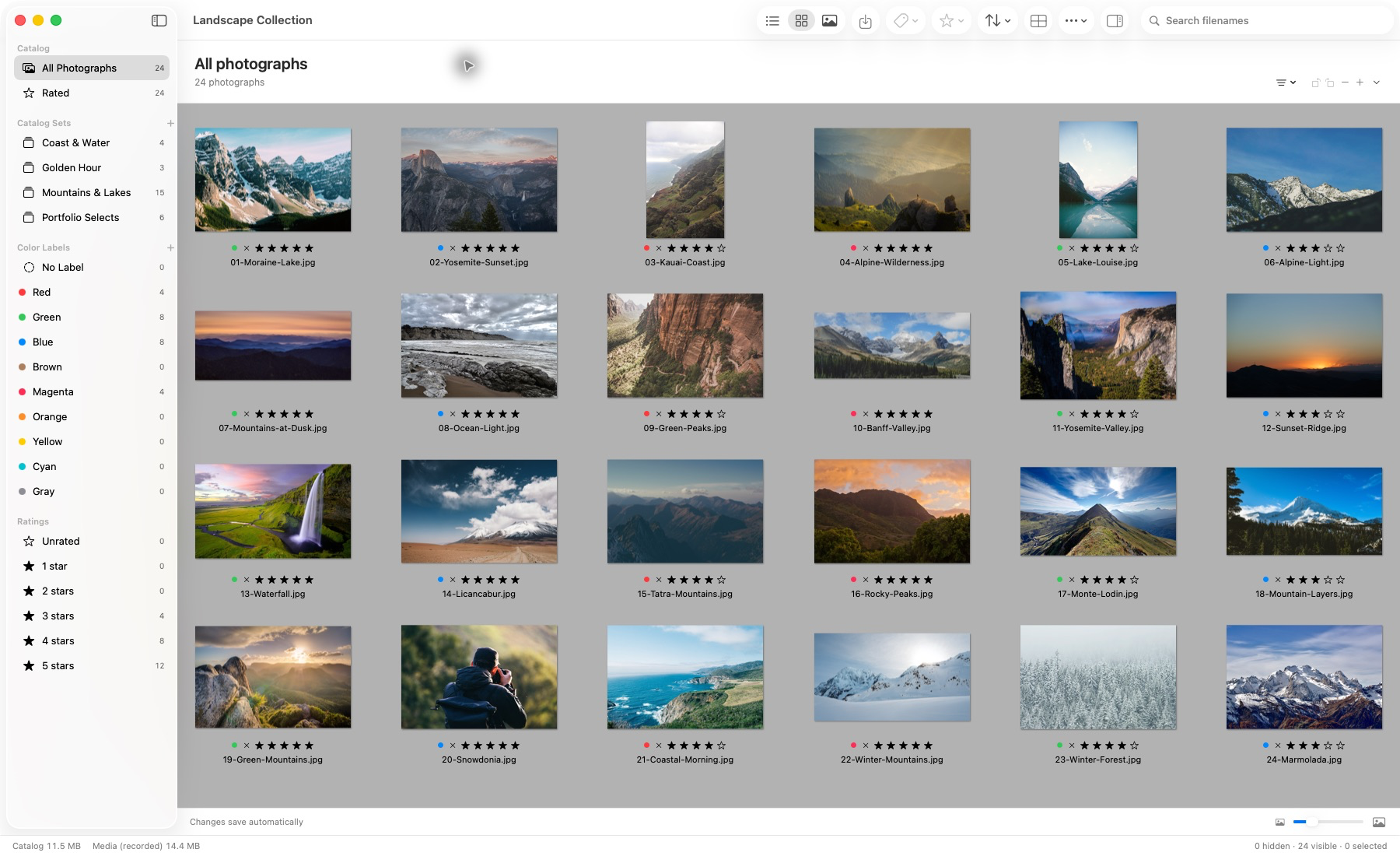
Actual application capture. Photographs remain in their source locations.
The supplied catalog screenshot was captured in build 50. It shows the established organization interface, not the newer Loupe or import-progress controls. In build 60, committed local-import batches become browsable while import continues. The catalog strip distinguishes imported photographs from prepared offline previews and provides Stop; it does not claim that every imported RAW has finished full-detail rendering.
Light Table displays one to six selected photographs, with linked or independent zoom and pan. A useful comparison is to keep the same expression, detail or framing question in mind while moving between candidates. Access to originals matters: a reduced offline preview cannot establish the same detail as an available full-resolution photograph. See the practical side-by-side comparison guide.
The pointer-following Loupe now adds 100%, 200% and 400% inspection. Press L with a photograph viewer focused to toggle it. Its detail information distinguishes verified raster source detail, system RAW images with unverified detail, editing previews and reduced offline previews. Enlarging one of the latter does not certify sensor-level sharpness.
Supported original iView MediaPro catalogs are a separate reason to evaluate Lightbox Pro. Direct import covers the verified 025i JPEG/TIFF/PSD subset and creates a new .lightbox catalog after review. The documented 24- and 133-photo cases do not prove universal compatibility. This is not a Photo Mechanic or Plus database importer; read the original .ivc import procedure for its actual boundaries.
Compare requirements, not product labels
Scroll across to compare all columns.
| Requirement | Photo Mechanic | Lightbox Pro evidence |
|---|---|---|
| Ingest and import | Documented background card ingest, secondary destination and incremental options. | Concurrent local import and culling, stage/preview progress and Stop. Equivalent automated multi-destination card ingest is not established. |
| Selection | Keyboard review, ratings and 2-Up comparison. | Manual keyboard review, ratings, labels, Loupe and one-to-six-image Light Table. |
| Metadata exchange | IPTC templates and documented metadata-writing controls. | Imported legacy text is read-only; no general XMP writeback claim. |
| Long-term catalog | Plus supplied the database; its purchase withdrawal is dated above. | Local referenced catalog, filters and nested catalog sets. |
| Original iView import | No claim made here. | Reviewed conversion of a limited supported binary profile; separate XML route. |
A RAW preview is a separate requirement
Photo Mechanic normally displays embedded RAW previews and can optionally render previews with Apple ImageIO or Adobe DNG Converter on macOS. The official RAW rendering guide explains the distinction. It also supports sending selected files to external editors.
Lightbox Pro build 60 includes editable crop and rotation, Light brightness/contrast, Color Balance, Levels and Duotone preview adjustments. Levels has black, midtone/gamma and white controls, with an original RGB preview histogram. That histogram is not live adjusted or sensor data. Native JPEG/TIFF and Canon CR2 preview checks establish interaction and persistence, not accepted RAW-development quality.
The reviewed RAW edit path operates on system-rendered RGB. True sensor development, camera-calibrated white balance and highlight/shadow recovery remain unfinished, as does protected full-source rendered export. An internal full-raster preparation component is not a completed export command. Evaluate those stages separately using the RAW workflow guide.
Run a small, reversible evaluation
- List the non-negotiables. Include ingest destinations, caption fields, supported files, comparison behavior and the downstream editor.
- Use a backed-up sample job. Include similar frames, a portrait, an unusual file and an offline source. Retain the current production workflow.
- Check the decisions after reopening. Confirm ratings, set membership, source references and the exact files prepared for the editor.
- Assess speed on your own workload. Record hardware, file types, preview state and task. No comparative Lightbox speed benchmark is established here.
If advanced ingest or interoperable captioning is essential today, Photo Mechanic’s documented workflow deserves full consideration. If the priority is a local working library and supported iView preservation, follow confirmed Lightbox Pro progress and review the cataloging checklist. These independently developed products are not affiliated or interchangeable by default.