
Wedding Photography Workflow, From Import to Final Selection
The work after a wedding begins with an intact archive and ends with a selection you can explain and reproduce. A few explicit checkpoints keep the photographs, the edit and the eventual delivery connected.
Close the gap between card and archive
Copy and verify the photographs before organizing the edit. A catalog makes a wedding easier to navigate, but it cannot repair a missing source card. Treat ingest as a separate checkpoint with a clear end: the expected files exist on working storage and on a separate backup, and representative files have been opened.
Consider an illustrative two-photographer wedding with six cards. Give every card a temporary identifier in a job note. Record who supplied it, where it was copied and whether verification finished. Keep cards out of the next shoot’s rotation until your own backup policy has been satisfied. The six-card example describes organization; it is not a Lightbox Pro ingest test.
Use a copying tool whose collision and verification behavior you understand. Check more than the first folder: include each photographer, camera and card. Investigate mismatched counts, read errors and unexpectedly small files before returning the cards.
Give the job a stable structure
A practical starting tree is one job folder with separate Originals, Working, Output and Notes folders. Inside Originals, camera/card branches preserve identity where filenames repeat. The names are a suggested convention; adapt them to an existing studio system rather than restructuring a successful archive to match an example.
Keep the catalog in a known backed-up location. A catalog backup and a photograph backup protect different things. Adobe makes this distinction explicitly for Lightroom Classic: its catalog backup does not include the photographs. Read Adobe’s catalog backup guidance if that is part of your editing workflow.
Lightbox Pro’s reviewed build references files in their existing locations. Catalog sets, ratings and labels provide another layer of organization without requiring a new file copy for every category. Intentional Rename and Transfer operations are separate physical file actions and need their own review.
Build 60 makes committed photographs browsable while catalog import continues, so a review can begin before offline-preview preparation is complete. Its status strip reports these stages separately. This supports an overlapping import/review process; it does not certify a particular camera, storage configuration or time to finish a wedding.
Check coverage before ranking frames
Walk through the day once for completeness: preparations, ceremony, groups, portraits, reception and any agreed details. Record gaps or questions while the shoot is still familiar. If two camera clocks differ, use known moments to understand the discrepancy; do not assume the catalog has automatically synchronized them.
Create broad job sets before fine selections. One possible hierarchy is River wedding → Ceremony → Processional, alongside Portraits and Reception. Lightbox Pro supports nested sets and overlapping membership in the reviewed build. A photograph can belong to a sequence and a final-selection set without becoming two original files.
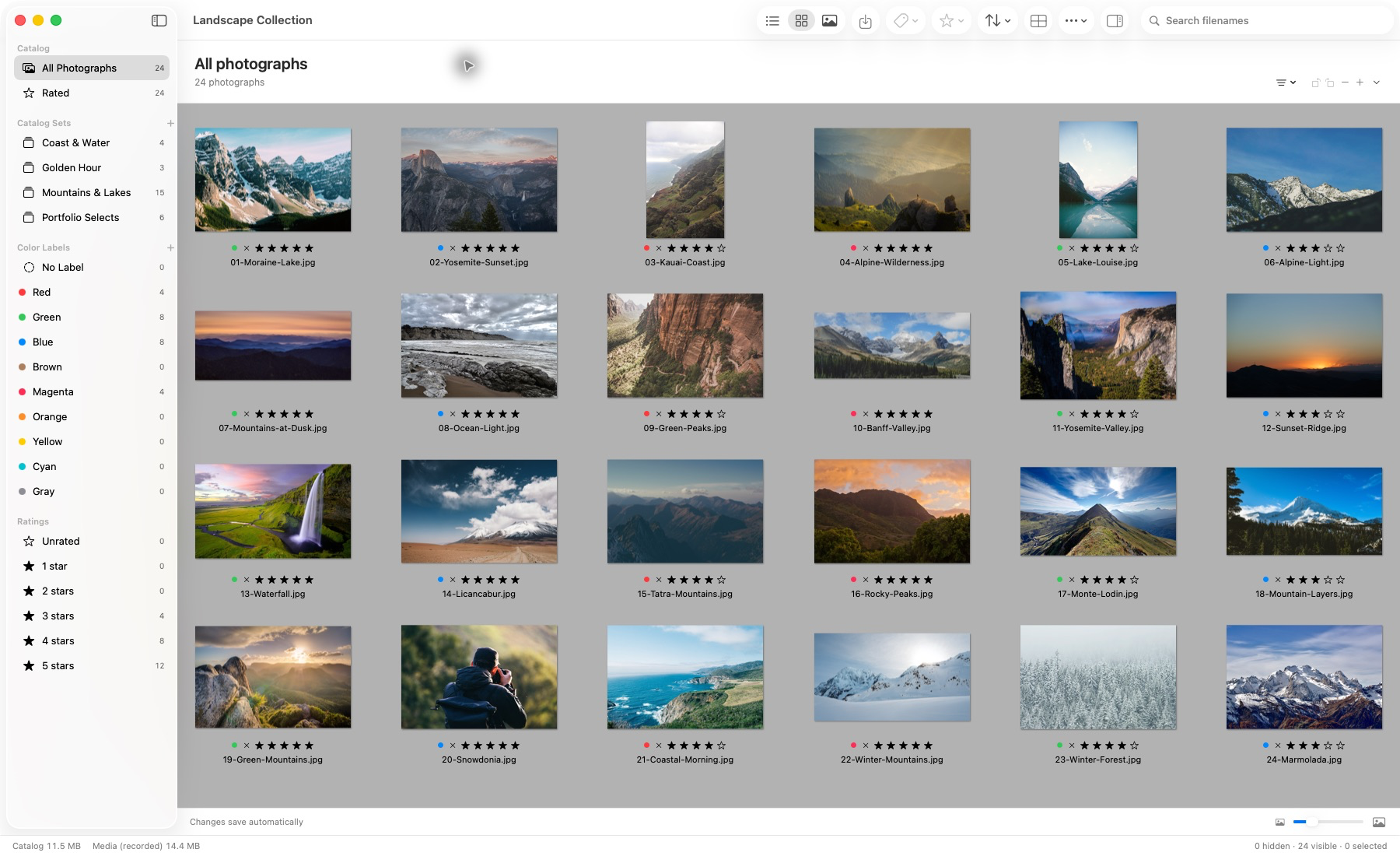
Actual application capture. Photographs remain in their source locations.
This authentic build-50 screenshot is a landscape demonstration library, not a client wedding or a capture of build-60 import progress. The wedding examples in this article are hypothetical organizational exercises. The capture provenance and photograph credits identify the supplied imagery.
Separate the review passes
- Coverage pass. Confirm the sequence and flag anything that needs later technical inspection. Do not spend the first pass perfecting color.
- Candidate pass. Mark plausible frames with a consistent rating or label. Defer close calls to a review set rather than interrupting the whole shoot repeatedly.
- Comparison pass. Inspect short runs of similar frames together. Decide on expression, gesture, focus and framing, then return to the sequence.
- Story pass. Review the shortlist in context. Check that eliminating repeats has not removed a necessary part of the day.
The wedding culling guide deals with the detailed decision within those passes. This workflow’s concern is the handoff between them: each pass should leave a selection that the next pass can understand.
Lightbox Pro supports manual keyboard review, ratings, labels, filtering and Light Table comparison of one to six photographs. Linked or independent zoom and pan help inspect similar frames; available originals are needed for full-detail focus decisions. There is no verified automated wedding-story selection, face ranking or duplicate-removal claim in the reviewed evidence.
Use the native Loupe for a localized look without changing the whole canvas scale. Toggle it with L while a browser or image canvas has keyboard focus, and choose magnification in its toolbar menu. Read its detail status before judging critical focus: reduced previews and system-rendered RAW imagery are explicitly qualified.
Make final selections traceable
Use a named final editing set instead of relying on a temporary highlight in the grid. A useful name includes the job and decision, such as River wedding — Editing selection — 21 Oct. Keep unresolved frames in a separate set with a short reason in the job note.
Check the final selection against the coverage list and any real client requirements. A strong individual portrait does not replace a required group photograph. Record intentional exceptions before editing begins, while the reason for a choice is still clear.
Save and reopen the catalog, then inspect the selection. Back it up at this checkpoint. If someone else will edit the job, explain the rating convention and whether an image is a final select, an alternate or an unresolved technical question. These distinctions should not depend on guessing what a color meant.
Prepare a controlled editing handoff
Choose whether the editor works from the referenced originals or from a separate copied selection. Avoid a mixed approach that leaves some files in the archive and others in an undocumented working folder. Lightbox Pro Transfer Copy mode can prepare separate source copies while leaving the original catalog references intact.
Copying originals is different from rendering edited JPEGs. In reviewed build 60, protected rendered proof export and app-controlled sensor-based RAW development are still unfinished, although a full-source raster preparation prerequisite has been tested. Use an independently validated editor/output workflow for those stages. A preview crop stored in a Lightbox catalog is not a promise that another editor will read it. Open With can hand selected available sources to a chosen application; test the resulting editing and output path before the full job.
Test the handoff with a few photographs before the full job. Include a paired RAW/JPEG, a rotated image and a file from the second photographer. Confirm file identity, naming, adjustments and the intended output location. See the RAW workflow guide for the distinction between viewing, preview edits and sensor development.
Keep delivery and client choices distinct
An editing selection answers “which originals will be finished?” A delivery answers “which rendered files were supplied?” A print or album selection answers another question again. Keep those decisions separately named, even if many of the same photographs appear in each.
Lightbox Pro’s client approval page describes the intended private-link and returned print/album-choice workflow. The reviewed application evidence does not establish a completed hosted gallery, synchronized client selections or album-design system. The website’s sample gallery is an illustration, not a delivery service.
Until a delivery integration is verified, use your established service and retain its selection records with the job. Check that an image number in a client’s note resolves to one exact delivered file and one original. A count of favorites is not enough when revisions or similarly named files exist.
Close the job with a restore check
Keep the original archive, catalog decisions, editing instructions, delivered files and a concise delivery record. Verify a restore of a representative subset to a separate location: open the catalog copy as intended, locate the correct originals and inspect the output. Avoid testing a restore by overwriting the only working job.
Leave a short closeout note: final selection location, editor version, output naming, backup locations and unresolved matters. It gives a future studio assistant—or your future self—a starting point without needing to reconstruct the whole job from thumbnails.
Lightbox Pro is independently developed by Zippi Technologies for a native Mac working-library approach. For current availability and verified progress, read Field notes or contact software support. For a stable archive structure, continue with organizing thousands of photographs.